
SERVICE BULLETIN
| Classification: | Reference: | Date: |
|---|---|---|
| EL15-024a | NTB15-077a | July 22, 2016 |
NISSAN; SIGNAL TECH-II INTELLIGENT KEY BATTERY TEST AND SIGNAL CHECK
| This bulletin has been amended. Changes have been made throughout. Please discard previous versions of this bulletin. |
| APPLIED VEHICLES: | 2015 – 2016 Altima (L33) |
|---|---|
| 2015 – 2016 Pathfinder (R52) | |
| 2015 – 2016 Pathfinder Hybrid (R52) | |
| 2015 – 2016 Rogue (T32) | |
| 2015 – 2016 Murano (Z52) | |
| 2016 Murano Hybrid (Z52) | |
| 2016 Maxima (A36) | |
| 2016 Titan XD (A61) |
IF YOU CONFIRM
The Intelligent Key intermittently or continuously does not function.
ACTION
Check the battery condition with the Signal Tech-II “I-Key Battery Test”.
IMPORTANT: Confirm that the Signal Tech-II has the most recent update. Update can be performed through ASIST / Specialty Tools / Signal Tech-II.
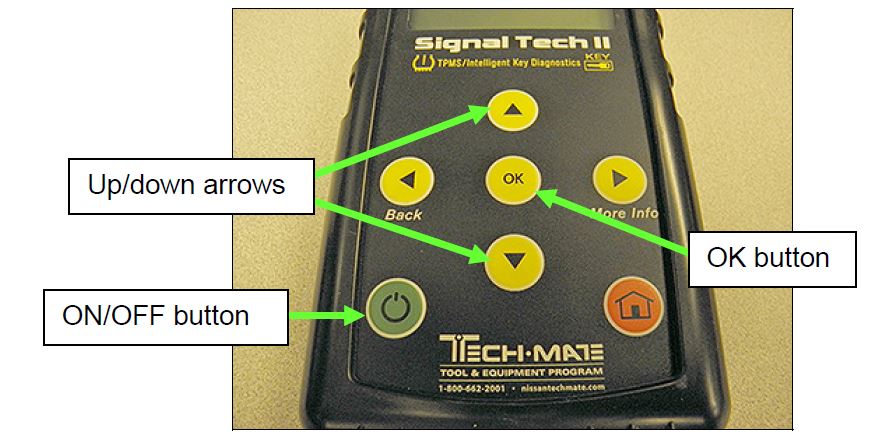
Figure A
SERVICE PROCEDURE
Intelligent Key Battery Condition Check
- Turn ON the Signal Tech-II (see Figure A on page 1).
NOTE: This procedure will refer to the yellow up/down arrows and OK button on the Signal Tech-II key pad. Refer to Figure A on page 1 as needed.
- Using the Signal Tech-II key pad; scroll to Toolkit with the yellow arrows and then press OK.
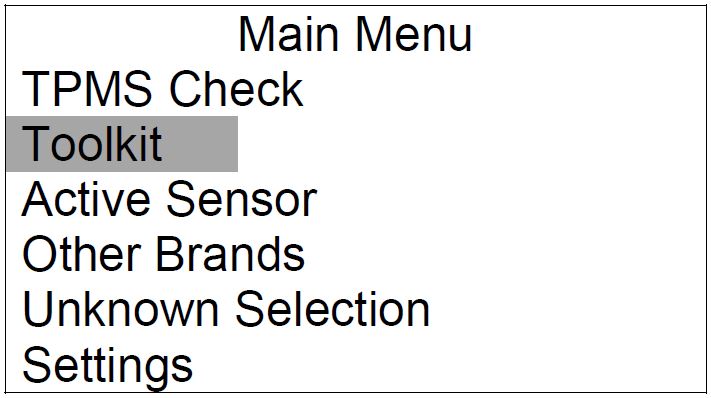
Figure 1
- Scroll to I-Key Battery Test, and then press OK.
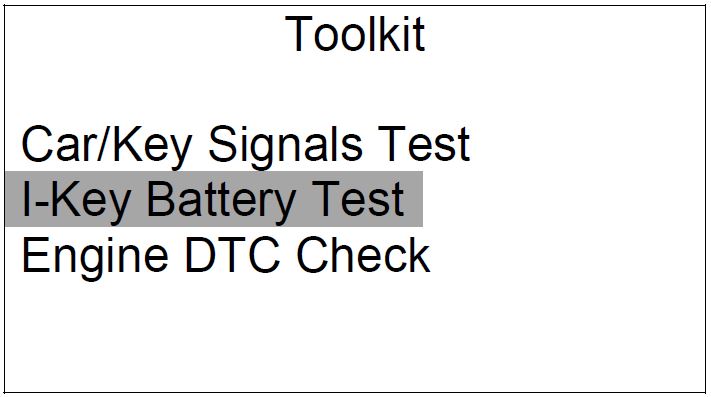
Figure 2
- Scroll to (highlight) the model you are working on, and then press OK.
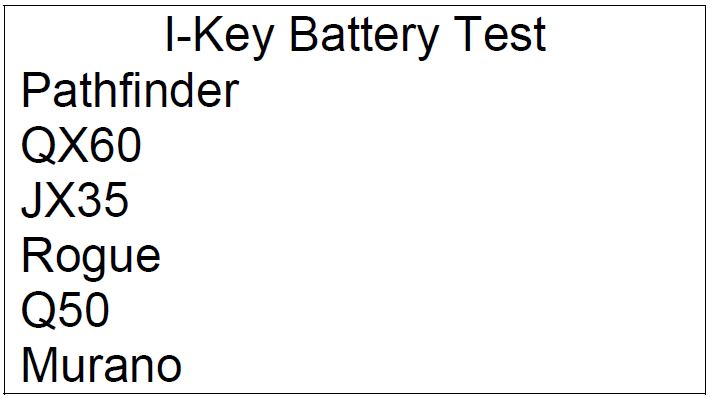
Figure 3
- Select (highlight) model year range, and then press OK.
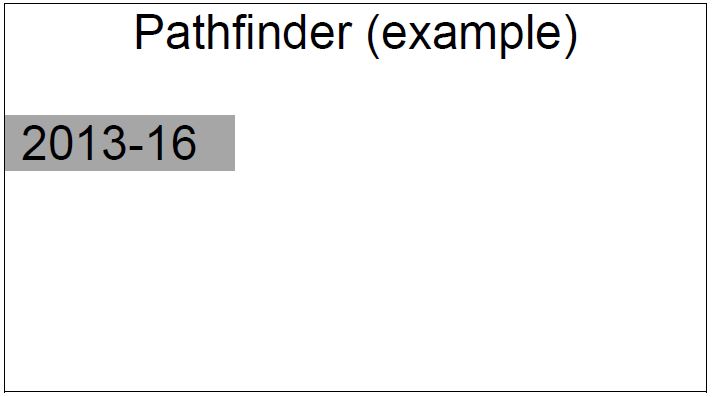
Figure 4
- When Figure 5 is displayed, read the onscreen message and then press OK.
NOTE: On-screen instructions will aid in completing the Intelligent Key battery test.
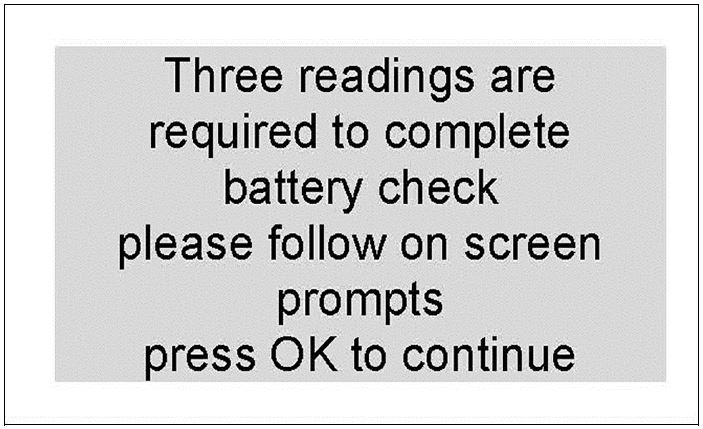
Figure 5
- Press the Intelligent Key lock button 3 times:
1st press – wait one second
2nd press – wait one second
3rd press – wait one second
- A check mark will appear next to Read 1, 2, and 3 with each press of the lock button.
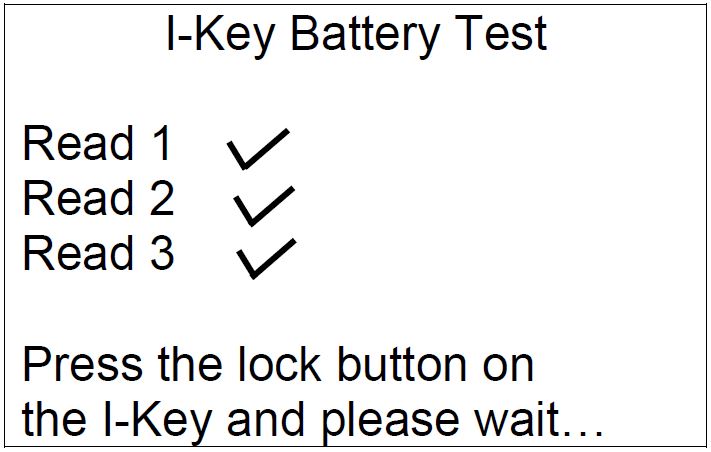
Figure 6
NOTE:
- In some rare cases the Intelligent Key battery may be too weak to transmit or the Intelligent Key may no longer function; check marks will not appear next to Read 1, 2, or 3.
- In this case, go to Manual Battery Voltage Test on page 5.
- When step 7 is complete, the message in Figure 7 or Figure 8 will display.
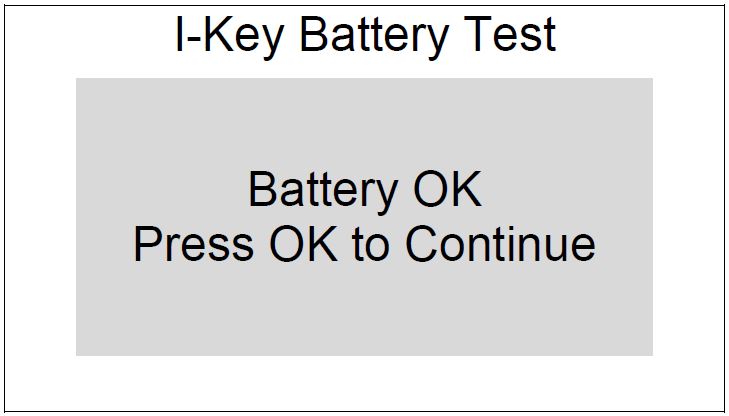
Figure 7
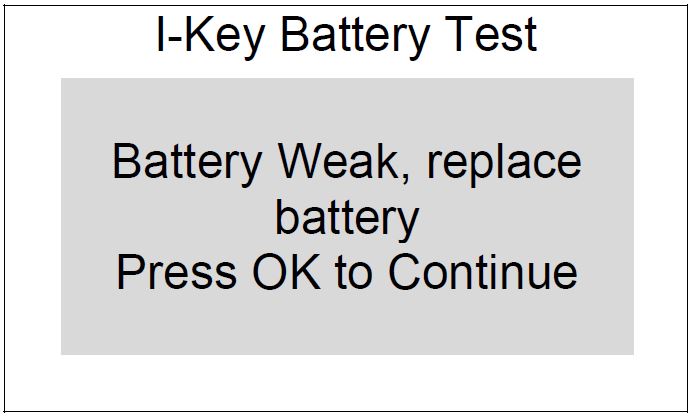
Figure 8
- If the message displayed is:
- Battery OK Press OK to Continue
- The battery is OK and does not need to be replaced.
- Refer to the Electronic Service Manual (ESM), section DLK – Door & Lock for further diagnosis.
- Battery Weak, replace battery Press OK to Continue
- Replace the Intelligent Key battery.
- Measure old battery’s voltage with a DVOM and write the voltage on the repair order.
- Perform steps 6 – 8 on pages 3 – 4 again.
Manual Battery Voltage Test
- Remove the mechanical key from the Intelligent Key.
- Place a piece of tape on the end of a small flathead screwdriver.
- Gently insert the screwdriver into one of the slots shown in Figures 9 and 10.
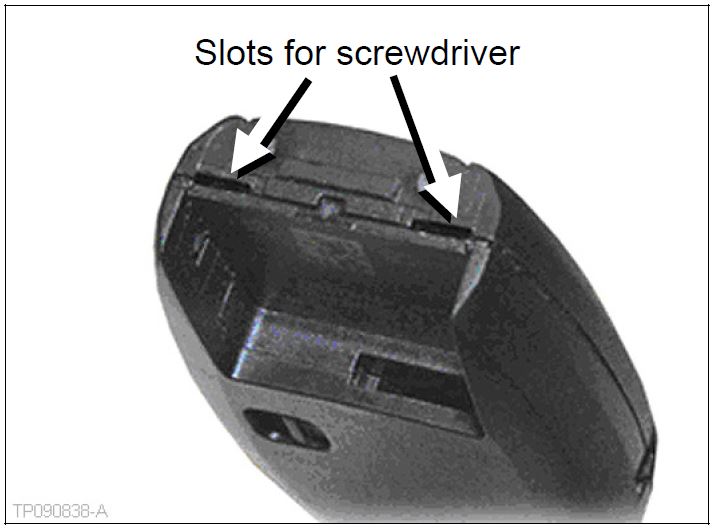
Figure 9
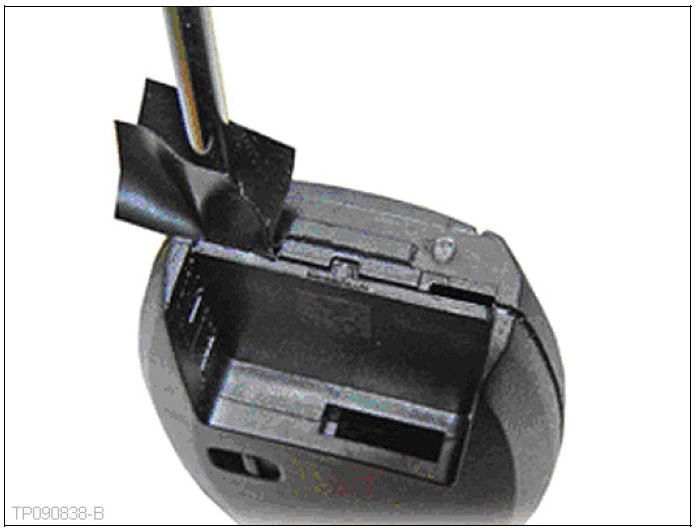
Figure 10
NOTE:
- Figures 9 and 10 show the proper location to insert a tool to open the Intelligent Key.
- DO NOT insert a tool into the notches on the side of the Intelligent Key (if equipped) to pry it open, as this may damage the printed circuit board.
- DO NOT use excessive force when opening the Intelligent Key, as this may result in damage to the internal components.
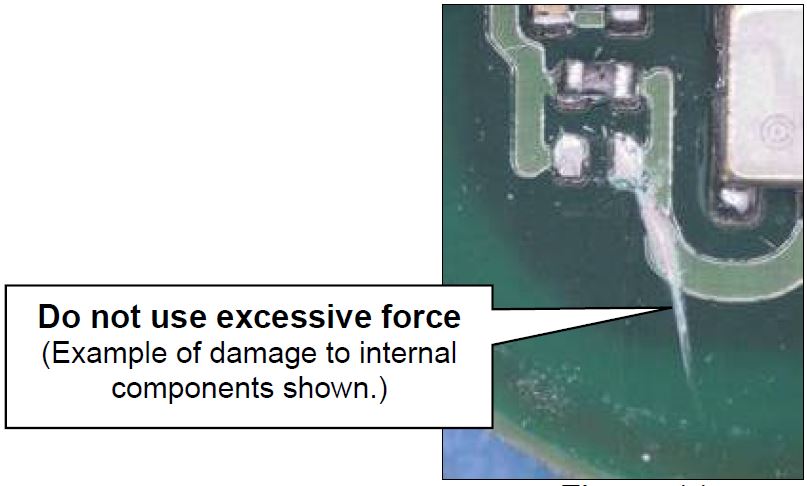
Figure 11
- Gently rotate the screwdriver until the two cover pieces separate (Figures 12 and 13).
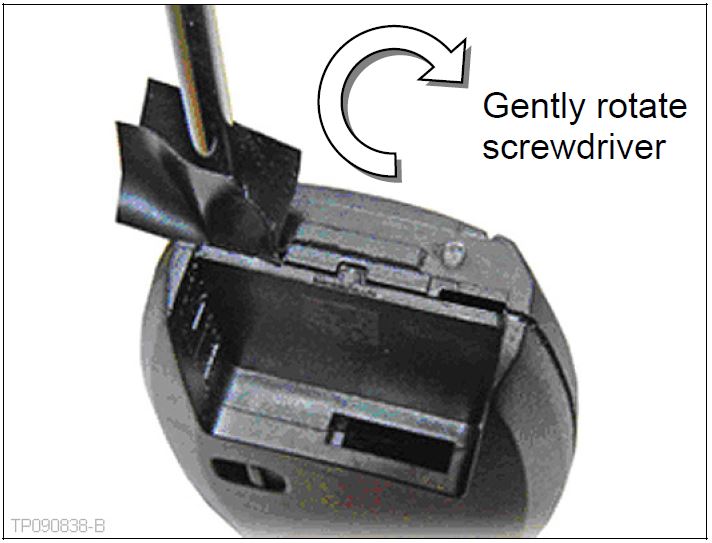
Figure 12
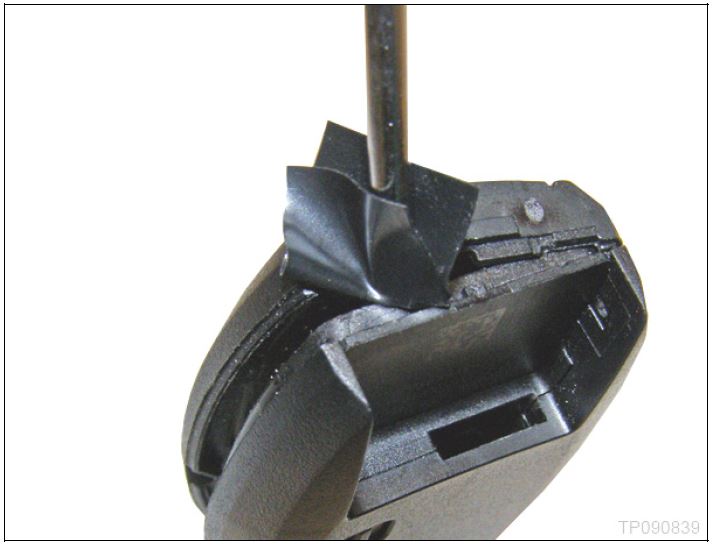
Figure 13
- Remove the battery and check the voltage.
Two methods can be used:
Check voltage with resistor (load test) Check voltage without resistor
| Refer to the Electronic Service
Manual (ESM), section DLK–Door & Lock, for the battery voltage check procedure. NOTE: When inserting the new battery, make sure the + side of the battery faces the bottom cover piece.
| If a resistor is unavailable, use a volt/ohm meter (VOM) to check the battery voltage.
NOTE: When inserting the new battery, make sure the + side of the battery faces the bottom cover piece.
|
- Reattach the two cover pieces by pushing them together.
- Confirm all Intelligent Key functions operate correctly.
Intelligent Key Frequency Check
- The frequency of the Intelligent Key signal may be 315 MHz or 433/434 MHz.
- For diagnostic purposes, sometimes TECH LINE or other Nissan technical staff will ask for the frequency (315 MHz or 433/434 MHz) of an Intelligent Key you are working on.
- The following steps can be used to check the signal frequency.
- Turn ON the Signal Tech-II.
- Using the Signal Tech-II key pad; scroll to Toolkit with the yellow arrows and then press OK.
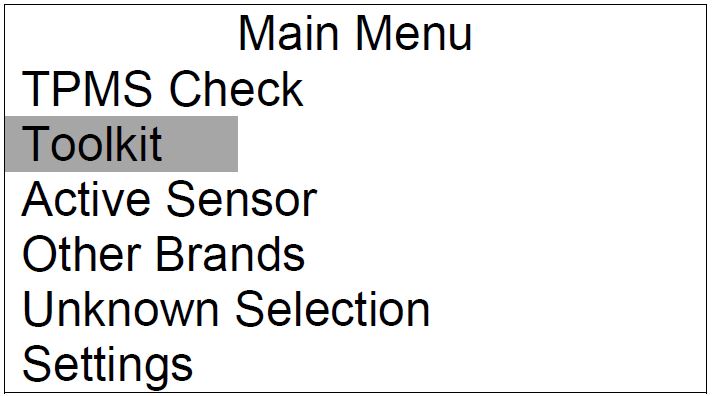
Figure 14
- Scroll to Car/Key Signals Test, and then press OK.
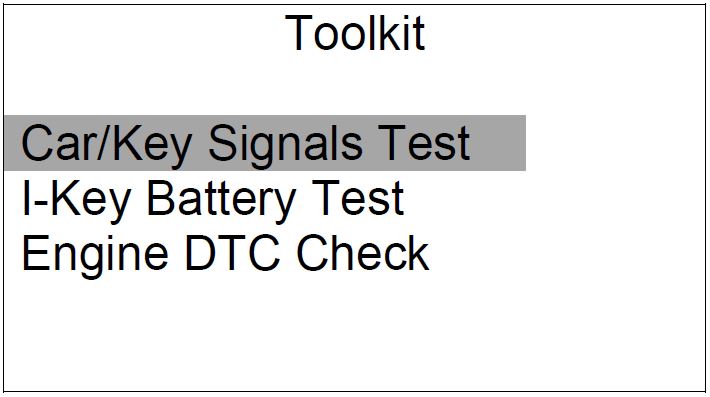
Figure 15
- Hold the Intelligent key near the Signal Tech-II and press the Lock or Unlock button.
- The signal strength and frequency (315 MHz or 433/434 MHz) will be displayed.
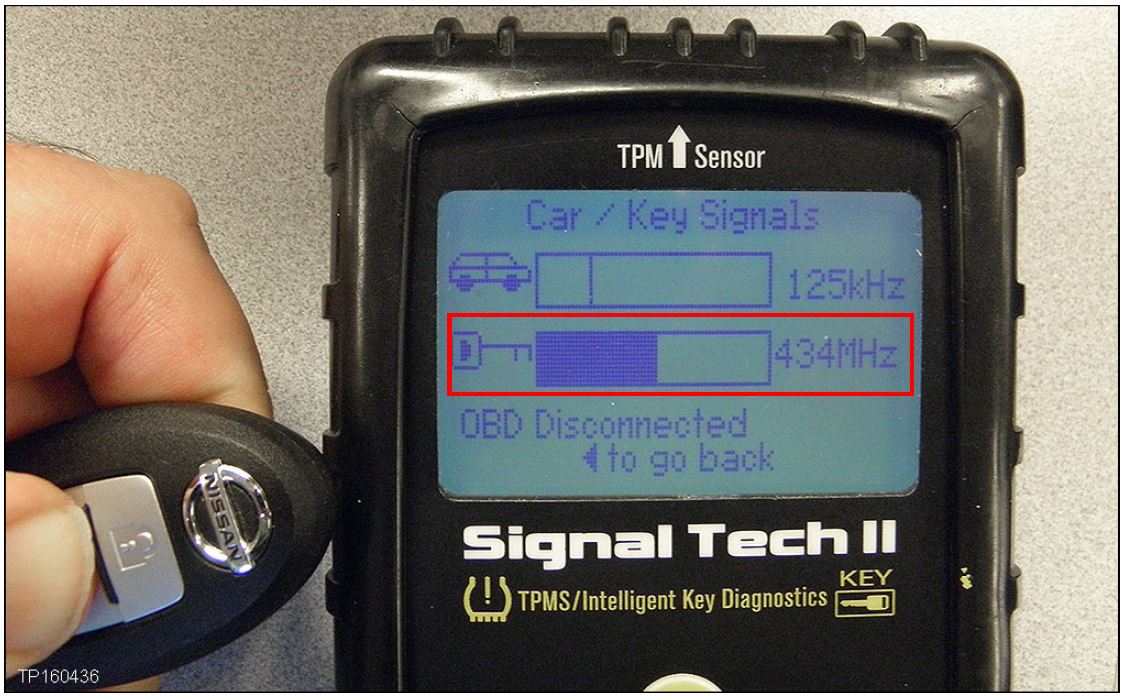
Figure 16
PARTS INFORMATION
| DESCRIPTION | PART # | QUANTITY |
|---|---|---|
| Intelligent Key Battery | B8599-C2032
Nissan B8599-C2032 Battery
| 1 |
| Intelligent Key | (1) | 1 |
(1) Use the VIN and the electronic parts catalog (FAST or equivalent) to look up the part number for the vehicle you are working on.
CLAIMS INFORMATION
Submit a Primary Failed (PP) type line claim using the following claims coding:
| OPERATION | PFP | OP CODE | SYM | DIAG | FRT |
|---|---|---|---|---|---|
| Perform I-Key Battery Test with Signal Tech-II | (2) | RX5CAA | ZE | 32 | 0.2 |
(2) Reference the Parts Information Table and use the applicable Part Number as the Primary Failed Part.
NTB15-077a

- HIGH-QUALITY: Every Single Keyless Entry Remote Control Car Key Fob is Fully Pre-tested by Professional Locksmith Tools before Shipping. All Our Key Fobs are Pre-installed with Battery and Electronics.
- COMPATIBILITY: Compatible with FCC ID KBRASTU15, CWTWB1U415, CWTWB1U733, CWTWB1U821. Please Check Our Product Description and Vehicle Fitment Tool for Full Compatible Vehicles List. This Remote Key Fob Replacement Is Compatible with Nissan Xterra 2002-2014 Titan 2002-2014 Armada 2005-2015 Frontier 2002-2019 Quest 2003-2009 Sentra 2007-2012 Murano 2003-2007 Pathfinder 2002-2013 Versa 2007-2013 Infiniti FX35 2003-2007 FX45 2003-2008 QX4 2002-2003
- REPLACEMENT: This Keyless Entry Remote Control Car Key Fob Replacement Is Compatible with Part Numbers: 28268-5W500, 28268-5W501, 28268-5W50A, 28268-7Z800, 28268-C990A, 28268-C990C
- PROGRAMMING: Self-Programming Instructions Link Will Be Provided with Every Order.
- PACKING LIST: 2 X Keyless Entry Remote Control Key Fob with Electronics and Battery Pre-Installed. Ready to Program.
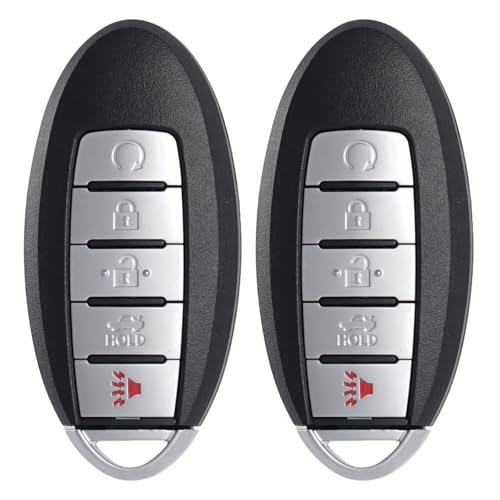
- HIGH-QUALITY: Every Single Keyless Entry Remote Control Car Key Fob is Fully Pre-tested by Professional Locksmith Tools before Shipping. All Our Key Fobs are Pre-installed with Battery and Electronics.
- COMPATIBILITY: Compatible with FCC ID KR5S180144014. Please Check Our Product Description and Vehicle Fitment Tool for Full Compatible Vehicles List. This Remote Key Fob Replacement Is Compatible with Nissan Altima 2016 2017 2018, Maxima 2016 2017 2018, Infiniti Q50 2016 2017 2018 2019, Q60 2017 2018.
- REPLACEMENT: This Keyless Entry Remote Start Control Car Key Fob Replacement Is Compatible with Part Numbers: 285E3-4RA0B.
- PROGRAMMING: It Requires Auto Locksmith or Dealership to Program it. Self-Programming is Not Available.
- PACKING LIST: 2 X Keyless Entry Remote Control Key Fob with Electronics and Battery Pre-Installed. Ready to Program.

- 【Programming Methord】DIY programming is NOT available, it's necessary to be cut and programmed by a qualified dealer or locksmith.【NOTE】This smart key fob supports push-button vehicles only, not for regular key or keyed Ignition vehicles.
- 【Replacement】For FCC ID:KR55WK48903, KR55WK49622; P/N:285E3-1AA5B, 285E3-1CA5A, 285E3-1CA7A, 285E3-9N07A, 267T-5WK48903, 267T-5WK49622, 285E3-JK65A; Frequency:315 MHZ; Please Make Sure That Your Original Remote Has the Same Buttons on it
- 【Compatibility】Compatible with 2007-2012 Nissan Altima/ 09-14 Maxima/ 2009-2014 Nissan Murano/ 09-12 Infiniti FX35/ 2013 FX37/ 09-13 FX50/ 11-12 G25/ 07-08 G35/ 08-13 G37/ 2015 Q40/ 14-16 Q60 QX70. Please Check Our Product Description and Vehicle Fitment Tool for Full Compatible Vehicles List
- 【OEM-Quality】Made of Premium Plastic Materials, Shockproof, Every Single Keyless Entry Remote Start Control Car Key Fob is Fully Pre-tested by Professional Locksmith Tools before Shipping. 100% New Brand Remote Control Car Key Fob, The Function is the Same as the Factory Original Car Key Fob and includes Remote Control Features Lock, Unlock, Trunk release, Panic alarm.
- 【Package Include】1x Keyless Entry Remote Start Control Key Fob with Electronics and Battery Pre-Installed.【WARRANTY】Buy with Confidence, 24-Months Warranty and Lifetime Support. If You Find They Don't Work or Any Problems, Just Feel Free to Contact us Anytime, We Will Arrange Free Refund or Return for You

- Replacement: For Remote fob FCC ID: KR5TXN4; Continental: S180144803; Part # 285E3-6CA6A ; Frequency:433MHz; Key Fob Replacement Suitable for 2019 2020 2021 2022 2023 Nissan Altima/2020 2021 2022 2023 Nissan Versa & Sentra
- Programming Methord: This vehicle is not on board programmable and requires a qualified professional to program smart key remote fobs, this remote key fob must be programmed and cut by a qualified locksmith or dealership
- Assembly & Testing: 1 Fob Key with Electronic board and Battery are included and pre-installed; Each item has been tested before shipping
- Instructions for use: It's a 100% Brand New 5 button Keyless Fob Remote Control Car Key and blank key, which needs to be programmed and cut before use; if not don't know how to do, contact us please. This Transmitter WorkS on Push Start Button Vehicles
- Purchase Instructions: Make sure that your OEM information (include FCC ID, Frequency, part number) and button appearance is the same as ours and If you don't know, please consult your dealership or us

- Replacement: For Remote fob P/N: 285E3-JA05A; FCC ID: KR55WK48903, KR55WK49622; Key Fob Replacement Suitable for 2009-2014 Maxima/2007-2013 Altima/2007-2012 Nissan Versa/2008-2012 Infiniti EX35/2009-2012 Infiniti FX35/2007-2008 Infiniti G35/2008-2013 Infiniti G37/2011-2012 Infiniti G25/2014-2014 Infiniti Q60/2015 Infiniti Q40/2009-2014 Nissan Muran/2009-2015 Nissan 370Z/2014-2016 Infiniti QX70/2013 Infiniti FX37.
- Programming Methord: Remote needs to be programmed by a locksmith and dealership, this smart remote fob key must be programmed and cut by a qualified locksmith or dealership.
- Assembly & Testing: 1 Fob Key with Electronic board and Battery are included and pre-installed; Each item has been tested before shipping.
- Instructions for use: It's a 100% Brand New 4 button Keyless Fob Remote Control Car Key and blank key, which needs to be programmed and cut before use; if not don't know how to do, contact us please. This Transmitter Works on Push Start Button Vehicles;
- Purchase Instructions: Make sure that your OEM information (include FCC ID, Frequency, part number) and button appearance is the same as ours and If you don't know, please consult your dealership or us.
This product presentation was made with AAWP plugin.