
July 17, 2020 NHTSA CAMPAIGN NUMBER: 20V412000
No Back-Up Camera Display Image/FMVSS 111
The lack of an image in the back-up camera display increases the risk of a crash.
NHTSA Campaign Number: 20V412
Manufacturer Nissan North America, Inc.
Components BACK OVER PREVENTION
Potential Number of Units Affected 6,157
Summary
Nissan North America, Inc. (Nissan) is recalling certain 2020 LEAF electric vehicles. Under certain circumstances, the images for the back-up camera can disappear while in reverse. As such, these vehicles fail to comply with Federal Motor Vehicle Safety Standard (FMVSS) number 111, “Rear Visibility.”
Remedy
Nissan will notify owners, and dealers will update the back-up camera software, free of charge. This recall began August 31, 2020. Owners may contact Nissan customer service at 1-800-867-7669.
Notes
Owners may also contact the National Highway Traffic Safety Administration Vehicle Safety Hotline at 1-888-327-4236 (TTY 1-800-424-9153), or go to www.safercar.gov.
Check if your Nissan has a Recall
SAFETY RECALL
CAMPAIGN BULLETIN
Rear View Monitor
Voluntary Recall Campaign
Reference: PC743
Date: August 14, 2020
Attention: Dealer Principal, Sales, Service & Parts Managers
| REVISED August 14, 2020
Please discard earlier versions of this bulletin. | ||||
| The announcement from July 17, 2020 has been revised to include the following:
Please see the amended answer in the Q&A section of this announcement:
|
IMPORTANT: It is a violation of Federal law for retailers to sell or deliver vehicles in their inventory covered by this notification until the campaign action is performed.
| Affected Models/Years: | Affected Population: | Dealer Inventory: | SERVICE COMM Activation date: | Stop Sale In Effect |
| 2020 LEAF (ZEl) | 4,357 | 2,938 | July 17, 2020 |
YES |
***** Campaign Summary *****
Nissan is committed to the safety and security of our customers and their passengers. Nissan has notified the National Highway Traffic Safety Administration (NHTSA) and Transport Canada that it is recalling certain MY2020 Nissan LEAF vehicles in the US and Canada to address an Around View Monitor (AVM) and Rear View Monitor (RVM) display issue.
Due to a software issue on affected vehicles, under certain conditions at vehicle start up, the Around View Monitor (AVM) and Rear View Monitor (RVM) camera image may disappear and change to the previous screen display while the vehicle is in reverse. This condition does not meet the requirements of FMVSS/CMVSS No. 111; Rear Visibility. Nissan will update the Around View Monitor /Rear View Monitor (AVM/RVM) display control unit software to remedy this condition.
***** What Dealers Should Do****
- Verify if vehicles are affected by this Voluntary Recall using Service Comm or DBS National Service history – Open Campaign I.D. PC743.
- New vehicles in dealer inventory can also be identified using DBS (Sales-> Vehicle Inventory, and filter by Open Campaign).
- Refer to NPSB 75-460 for additional information
- Please continue to check newly arriving inventory for campaign applicability.
- Dealers should use NTB20-051 to remedy any vehicles subject to this campaign.
- Once remedied, dealers should submit the claim, using the claims coding provided, and release the vehicle.
***** Release Schedule *****
| Parts |
|
| Special Tools | J-52727 USB Flash Drive (Dealers should already have this special tool from a previous campaign.)
|
| Repair | |
| Owner Notification | Nissan will begin notifying owners of all potentially affected vehicles in August 2020 via US Mail. |
***** Dealer Responsibility*****
It is the dealer’s responsibility to checl< Service Comm or DBS National Service History using the appropriate Campaign ID. for the campaign status on each vehicle falling within the range of this voluntary recall campaign, which for any reason enters the service department This includes vehicles purchased from private parties or presented by transient (tourist) owners and vehicles in new vehicle inventory. If a VIN subject to this recall campaign was part of a dealer trade, the letter associated with that VIN should be forwarded to the appropriate dealer for service completion.
NISSAN NORTH AMERICA, INC.
Aftersales DIVISION
Frequently Asked Questions (FAQ):
| Q. | Is this a recall? | ||||||||||||
| A. | Yes. A Stop Sale is in effect.
| ||||||||||||
| Q. | What is the reason for the recall? | ||||||||||||
| A. | Due to a software issue on affected vehicles, under certain conditions at vehicle start up, the Around View Monitor (AVM) and Rear View Monitor (RVM) camera image may disappear and change to the previous screen display while the vehicle is in reverse. This condition does not meet the requirements of FMVSS/CMVSS No. 111.
| ||||||||||||
| Q. | What is the possible effect of the condition? | ||||||||||||
| A. | The Around View Monitor (AVM) and Rear View Monitor (RVM) camera image may disappear and change to the previous screen display while the vehicle is in reverse. The potential for loss of rearview image during a backing event may lead to the increased risk of a crash or injury to a person behind the vehicle. | ||||||||||||
| Q. | What will be the corrective action for this voluntary recall campaign? | ||||||||||||
| A. | Dealers will update the Around View Monitor {AVM)/Rear View Monitor (RVM) display control unit with countermeasure software.
| ||||||||||||
| Q. | How long will the corrective action take? | ||||||||||||
| A. | This service, which is conducted at no charge to you for parts and labor, should take less than one (1) hour to complete. However, your Nissan LEAF certified dealer may require your vehicle for a longer period of time based upon their work schedule.
| ||||||||||||
| Q. | When will vehicle owners be notified? | ||||||||||||
| A. | Nissan will begin notifying owners of all potentially affected vehicles in August 2020 via U.5 Mail.
| ||||||||||||
| Q. | What if the customer’s vehicle was remedied before they received the owner notification letter? | ||||||||||||
| A. | If the vehicle was reprogrammed prior to the owner notification and there is no campaign open in Service Comm or DBS National Service History, no further action is required.
| ||||||||||||
| Q. | Is my vehicle safe to drive? | ||||||||||||
| A. | Owners may continue to drive their vehicles at t heir discretion. If your vehicle is subject to this campaign, you will receive an Owner Notification letter from Nissan, which will provide instructions on how to remedy your vehicle.
| ||||||||||||
| Q. | Is there anything owners can do to mitigate this condition? | ||||||||||||
| A. | If the vehicle has been shifted into reverse wit hin 25 seconds of starting the vehicle, avoid reversing at speeds of 7.5 mph or higher and do not press “OJ<” to acknowledge the rear sonar notification on the vehicle information display. If the rear camera image should disappear under these conditions, it can be restored by stopping the vehicle, shifting into park, and then shifting back into reverse.
Contact your Nissan dealer at your earliest convenience in order to arrange an appointment to have your vehicle reprogrammed.
| ||||||||||||
| Q. | Is software readily available? | ||||||||||||
| A. | Yes.
| ||||||||||||
| Q. | Are additional special tools available? | ||||||||||||
| A. | Dealers should already have this special tool from a previous campaign. Additional tools will be available via TechMate@ 7-800-662-2001 or via www.nissantechmate.com. Dealers may use the ASIST downloader tool to create additional USB drives.
| ||||||||||||
| Q. | I have a Nissan Rental Car (NRC) out on loan. Do I have to bring that vehicle back in to have the recall performed? | ||||||||||||
| A. | Affected vehicles must be remedied before being rented or being loaned out to a customer. If a NRC is out on loan, Nissan recommends notifying the customer of the recall and available remedy.
| ||||||||||||
| Q. | Will a rental vehicle be provided while the dealer is servicing the vehicle? | ||||||||||||
| A. | Complimentary alternate transportation is available if your vehicle requires parts replacement.
| ||||||||||||
| Q. | Is there any charge for this service? | ||||||||||||
| A. | No. The remedy will be performed for the customer free of charge for parts and labor.
| ||||||||||||
| Q. | Do campaign software updates affect the owner’s personal settings or Nissan Connected Services? | ||||||||||||
| A. | Nissan Connected Services settings should not be affected by the system update.
| ||||||||||||
| Q. | Will I have to take my vehicle back to the selling dealer to have the service performed? | ||||||||||||
| A. | No, any authorized Nissan LEAF certified dealer is able to perform the recall campaign.
For Consumer Affairs: Please inform us of the dealer where you would lil<e to have the corrective action completed.
| ||||||||||||
| Q. | I have lost confidence in the vehicle. Will Nissan replace or repurchase the vehicle? | ||||||||||||
| A. | The remedy will fully correct this condition. As the condition will be corrected, there is no basis for repurchasing or replacing your vehicle.
| ||||||||||||
| Q. | What model year vehicles are involved? | ||||||||||||
| A. | Certain 2020 Nissan LEAF vehicles manufactured in the Smyrna, TN plant within a specific production range are affected.
| ||||||||||||
| Q. | How many vehicles are involved in the campaign? | ||||||||||||
| A. | The number of units potentially affected is as follows:
| ||||||||||||
| Q. | Are you experiencing this condition on any other Nissan (or INFINITI) models? | ||||||||||||
| A. | No.
| ||||||||||||
Revision History:
| Date | Announcement | Purpose |
| July 17, 2020 | Voluntary Recall Campaign | New Campaign Announcement |
| August 14, 2020 | REVISION 1 | Revised mitigation Q&A |
OWNER NOTIFICATION
NOTIFICACIÓN PROPRIETARIO
NHTSA RECALL 20V-412
Dear Nissan LEAF Owner:
This notice is sent to you in accordance with the National Traffic and Motor Vehicle Safety Act. Nissan has decided that certain 2020 Model Year Nissan LEAF vehicles fail to conform to Federal Motor Vehicle Standard (FMVSS) number 111, “Rear Visibility.” Our records indicate that you own or lease the Nissan vehicle identified by the VIN on the inside of this notice.
Reason for Recall
Motivo del Retiro
Your vehicle is equipped with a rearview camera system to aid the driver when backing up. Due to a software issue in your vehicle, under certain conditions at vehicle start up, the Around View Monitor (AVM) and Rear View Monitor (RVM) camera image display may disappear and change to the previous screen display while the vehicle is in reverse. The potential for loss of rearview image during a backing event may lead to an increased risk of a crash or injury to a person behind the vehicle.
What Nissan Will Do
Qué Hará Nissan
Your Nissan dealer will update the AVM/RVM display control unit with updated software free of charge. This free service should take less than one (1) hour to complete, but your Nissan dealer may require your vehicle for a longer period of time based upon your vehicle trim level and their work schedule.
What You Should Do
Qué Debes Hacer
If the vehicle has been shifted into reverse within 25 seconds of starting the vehicle, avoid reversing at speeds of 7.5 mph or higher and do not press “OK” to acknowledge the rear sonar notification on the vehicle information display. If the rear camera image should disappear under these conditions, it can be restored by stopping the vehicle, shifting into park, and then shifting back into reverse.
Contact your Nissan dealer at your earliest convenience in order to arrange an appointment to have your vehicle reprogrammed. Please bring this notice with you when you keep your service appointment. For more information about the recall, please visit https://nna.secure.force.com/recall?camp=PC743 .
Comunícate con cualquier concesionario INFINITI a la mayor brevedad para concertar una cita de reparación para tu vehículo. Se requiere que traigas esta notificación el día de tu cita. Para obtener más información sobre el retiro, visite https://nna.secure.force.com/recall?camp=PC743 .
If the dealer fails to, or is unable to make the necessary repairs free of charge, you may contact the National Consumer Affairs Department, Nissan North America, Inc. P.O. Box 685003, Franklin, TN 370685003. The toll free number is (877) NO GAS EV (877-664-2738)
Si el concesionario no cumple, o no le es posible realizar las reparaciones necesarias sin cargos, puedes contactar al Departamento Nacional de Asuntos del Consumidor a: National Consumer Affairs Department, Nissan North America, Inc. P.O. Box 685003, Franklin, TN 37068-5003. El número libre de cargos es (877) NO GAS EV (877-664-2738)
You may also submit a complaint to the Administrator, National Highway Traffic Safety Administration, 1200 New Jersey Avenue, SE., Washington, DC 20590; or call the toll-free Vehicle Safety Hotline at 1-888327-4236 (TTY: 1-800-424-9153); or go to https://www.safercar.gov.
Federal law requires that any vehicle lessor receiving this recall notice must forward a copy of this notice to the lessee within ten days.
Thank you for your cooperation. We appreciate your Nissan ownership and apologize for any inconvenience this may cause you.
Gracias por tu cooperación. Agradecemos tu patrocinio como dueño de un Nissan y te ofrecemos nuestras disculpas por cualquier inconveniente que esto pueda ocasionar.
July 16, 2020
Mr. Jeff Giuseppe
Associate Administrator for Enforcement
National Highway Traffic Safety Administration
Attn: Recall Management Division (NVS-215)
Room W48-302
1200 New Jersey Avenue, SE
Washington, D.C. 20590
Dear Mr. Giuseppe:
We are transmitting the enclosed Non-Compliance Information Report in accordance with 49 CFR Part 573. A voluntary recall campaign will be initiated and your office provided with the notices.
Very truly,
Derek Latta
Manager,
Technical Compliance
Encl.
NONCOMPLIANCE INFORMATION REPORT
- Manufacturer:
Nissan North America, Inc., Smyrna plant
- Vehicles Potentially Involved:
Certain Model Year 2020 Nissan LEAF vehicles manufactured in the Smyrna, TN plant from December 3, 2019 (Start of Production) to March 31, 2020.
Based on production records, the subject software version is unique to the subject Nissan LEAF vehicles produced at the Smyrna plant and this issue affects no other Nissan or Infiniti vehicles.
- Total Number of Vehicles Potentially Involved:
Approximately 6,157 Nissan LEAF vehicles
- Percentage of Vehicles Estimated to Actually Contain the Noncompliance:
100%
- Description of the Noncompliance:
When the shifter is in Reverse and the following conditions occur within 25 seconds of head unit cold start, the Around View Monitor (AVM) and Rear View Monitor (RVM) rearview image disappears and is replaced with the previous screen display:
- If the driver presses “OK” to acknowledge the sonar pop-up display on the combi meter; or
- If the reverse driving speed is 7.5 mph or greater.
Both scenarios cause the rearview image to deactivate while the vehicle is in reverse, which does not meet the requirements of S5.5.5 of Federal Motor Vehicle Safety Standard (FMVSS) No. 111; Rear Visibility. The potential for loss of rearview image during a backing event may lead to the increased risk of a crash or injury to a person behind the vehicle.
- Basis for Determination of the Existence of a Noncompliance
January 2020 – During a routine internal vehicle audit, an engineer observed that the Around View Monitor (AVM) display disappeared during a backing event. Nissan began an investigation into the issue to determine root cause.
February 2020 – Nissan initiated in-vehicle testing as part of the investigation process.
March 2020 to June 2020 – Nissan experienced business interruptions of U.S. operations due to COVID-19 public health concerns. The Smyrna, TN plant was shut down during March 28, 2020 to June 28, 2020. During the shutdown, the investigation process was slowed due to disruptions while complying with stay-at-home orders. The testing confirmed the condition was able to be replicated in production vehicles in some instances.
June 2020 to July 2020 – Nissan analyzed the investigation findings as the initial cause of the condition was unclear. The analysis revealed the issue could only occur within twenty-five (25) seconds after “cold start” while the head unit may experience a higher CPU load. During that time period, specific actions requiring either driver input or higher vehicle speed during the backing event (as described in Section 5 above) must occur for the rear view image to disappear. Nissan determined that the camera priority mode setting within the head unit software was incorrect, resulting in the potential for the camera image display to disappear and revert to the previous screen during a backing event under these very specific set of vehicle and driver conditions.
July 9, 2020 – Based on the foregoing, Nissan made a noncompliance determination.
- Description of Corrective Action:
Nissan will notify all owners of potentially affected vehicles on August 17, 2020. Dealers will be notified on July 17, 2020. Dealers will reprogram the head unit with updated software.
We will not include a statement in the Part 577 owner notification concerning reimbursement for the cost of obtaining a pre-notification remedy as the subject vehicles are under warranty.
- Copy of Notices:
Copies of all notices will be provided to NHTSA as they become available.
1 Affected Product
Vehicle
| MAKE | MODEL | YEAR |
| NISSAN | LEAF | 2020 |
12 Associated Documents
Non-Compliance 573 Report
RCLRPT-20V412-2628.PDF 214.334KB
Recall Acknowledgement
RCAK-20V412-9851.pdf 288.804KB
NONCOMPLIANCE INFORMATION REPORT
RMISC-20V412-1788.pdf 42.514KB
Recall Quarterly Report #1, 2020-3
RCLQRT-20V412-6511.PDF 211.141KB
Remedy Instructions and TSB
RCRIT-20V412-4803.pdf 2862.007KB
Remedy Instructions and TSB
RCRIT-20V412-1563.pdf 2862.389KB
Recall Quarterly Report #3, 2021-1
RCLQRT-20V412-5970.PDF 211.33KB
Manufacturer Notices(to Dealers,etc) – NISSAN July 17, 2020
RCMN-20V412-4342.pdf 1025.484KB
Recall Quarterly Report #2, 2020-4
RCLQRT-20V412-4928.PDF 211.244KB
Manufacturer Notices(to Dealers,etc) – REVISION 1 – PC743 2020 LEAF Rear View Monitor – NCIR – Dealer Announcement
RCMN-20V412-2365.pdf 1127.692KB
Owner Notification Letter(Part 577)
RCONL-20V412-0167.pdf 63.953KB
Recall Quarterly Report #4, 2021-2
RCLQRT-20V412-3074.PDF 211.429KB
Latest Recalls Documents
Reprogramming
J2534-1 Re/Programming
Tutorial for Purchasing NERS Software
Software updated April 26, 2019 to version # 04.03.00. It is recommended the latest version of NERS be installed before connecting to a vehicle.
This NERS software supports reprogrammable Engine and Transmission control units from 1999 to 2019 model year vehicles, and 2005 MY and later VIN writing into ECUs, when using a Nissan validated pass-through device. Click the Reprogramming Tab for additional information on reprogramming. This software only provides ECU reprogramming, blank programming and VIN writing capability. It does not provide diagnostic or key programming capability. For Engine and Transmission control unit reprogramming and VIN writing capability on 2020 MY & newer, please use CONSULT-III plus or CONSULT-III plus R2R software.
Vehicle reprogramming requires the use of the following:
- Nissan validated J2534-1 device
- Nissan ECU Reprogramming Software (NERS)
- Personal computer running Windows XP (SP2 or later) or Windows 7 or 10 64Bit
- Applicable reprogram file
Nissan tested and validated the below listed devices. Nissan does not recommend the use of any other J2534-1 device not listed here.
| Manufacturer | Models |
| Actia | PassThru +XS |
| Autel | MaxiFlash Elite (with firmware v3.01) |
| Bosch | Mastertech VCI (SFP v5.11.9) |
| Dearborn Group | VSI-2534 |
| Drew Technologies/OPUS IVS | CarDAQ Plus, CarDAQ M, Mongoose ISO/CAN |
| Hella Gutmann Solutions | Mega Macs 42 SE (DT VCI), Mega Macs 66 (DT66) |
| Texa | TEXA Navigator TXTs Series |
Click the below link to purchase NERS diagnostic software.
Download Purchased ECU Data File(s)
Once you have purchased ECU data file(s) and your order is completed, your ECU files can be downloaded. Please verify that you are logged in to your account before proceeding.
Purchase of ECU data enables file download access for a period of 24 hours, after which time the file will no longer appear in your list of purchased data files. Be sure to download all data files immediately following your purchase.
When you purchase a J-2534 reprogramming file, you will get a zip file containing a data file (.dat, .pdx, .xcal, .7z), a .csv or .xml file and a Reprog_readme.pdf. Please review the readme file for information on where to place the files in your PC.
Please Note that J2534-1 supports reprogramming on 1999 MY and later vehicles.
How to find the proper J-2534 Reprogramming ECU file:
In order for you to locate the proper ECU file, you will need to look up the applicable Technical Services Bulletin(TSB) for your vehicle. Instructions in the TSB will pinpoint and advise you of the ECU part # to enter below.
Download Purchased ECU Data File(s)
Once you have purchased ECU data file(s) and your order is completed, your ECU files can be downloaded. Please verify that you are logged in to your account before proceeding.
Purchase of ECU data enables file download access for a period of 24 hours, after which time the file will not longer appear in your list of purchased data files. Be sure to download all data files immediately following your purchase.
Special Note: Nissan and Infiniti vehicle uses a high level of security when Re/programming or Configuration is performed to the vehicle ECUs. With the release of NERS software version 04.00.01 or greater, technicians will be required to login with their Nissan or Infiniti Techinfo website user ID and password to perform Re/programming and Configuration in NERS.
Login Instruction Guide
September 2013, Nissan and Infiniti began the phase in of “Blank” Service Parts ECUs and TCMs. Depending upon the model and model year, replacement modules come WITHOUT software. When a replacement module is installed in an applicable vehicle for any reason, it will need to be programmed.
When you purchase a J-2534 Blank programming file, you will get a zip file containing a data file (.dat, .pdx, .xcal, .7z), a .csv or .xml file and a Reprog_readme.pdf. Please review the readme file for information on where to place the files in your PC.
How to find the proper J-2534 Blank Programming ECU file:
- Obtain the blank ECU part number when you purchase the replacement ECU. Nissan’s and Infiniti’s parts catalog provides both the blank ECU part number and the ROM-DATA ID part number (after programming part number) to be used. Enter this blank ECU part number in the field below.
or
- Using C-III plus software, retrieve the blank ECU part number from the new ECU. Enter this blank ECU part number in the field below.
Please note: Take care after making your selection that the listed vehicle information matches the vehicle you are programming.
- Special Note: NERS Version 03.08 or higher supports Blank RWD, 5 speed TCM programming.
Download Purchased ECU Data File(s)
Once you have purchased ECU data file(s) and your order is completed, your ECU files can be downloaded. Please verify that you are logged in to your account before proceeding.
Purchase of ECU data enables file download access for a period of 24 hours, after which time the file will not longer appear in your list of purchased data files. Be sure to download all data files immediately following your purchase.
Special Note: Nissan and Infiniti vehicle uses a high level of security when Re/programming or Configuration is performed to the vehicle ECUs. With the release of NERS software version 04.00.01 or greater, technicians will be required to login with their Nissan or Infiniti Techinfo website user ID and password to perform Re/programming and Configuration in NERS.
Login Instruction Guide

- J2534 Pass-Thru Programmer: TOPDON RLink J2534 is an advanced diagnostic and reprogramming tool that support all J2534 protocols, as well as D-PDU, CAN-FD and DoIP, ensuring compatibility with a wide range of modern vehicles. It offers extensive versatility with support for over 18 major automotive brands, including Chrysler, Ford, GM, Nissan, Toyota, Honda, Subaru, Land Rover/Jaguar, Volvo, Wuling, Volkswagen/Audi, Mercedes-Benz, and BMW. NOTE: Not compatible with Ford IDS diagnostic software
- All-in-One OEM Diagnostics: This J2534 ECU programming tool elevates your automotive repair capabilities to new heights by delivering complete OEM diagnosis. Boasting comprehensive full-system diagnostics, intuitive repair guides, advanced ECU programming and coding, common reset services, a vast library of repair information and more, this all-in-one solution empowers technicians to effortlessly tackle complex vehicle issues with ease. *Not compatible with 24V vehicles
- Proven Performance You Can Trust: Backed by over 10000 real vehicle tests and benefit from a wealth of practical experience, this OEM reprogramming tool guarantees stable and exceptional performance. Supported by TOPDON's dedicated technical experts with in-depth knowledge of both auto repair and J2534 Pass-Thru programming, the RLink J2534 provides prompt and professional assistance, ensuring a smooth setup and reliable compatibility
- Integrated Excellence, Always Up-to-Date: Featuring the exclusive RLink Platform to provide a streamlined experience with one-click driver installation and management, ensuring flawless integration with your OE software, maintaining the original performance quality. The built-in operation guide makes mastering OE software quick and easy, so you can get started right away. Plus, with lifetime free updates, your diagnostics will stay current with the latest drivers and innovations
- Efficiency Meets Versatility: Engineered to support three CAN channels simultaneously - CAN FD and CAN-CC included, giving you the edge in fast troubleshooting. To perfectly synchronized with the OE software, please diagnose with active subscriptions and make sure your computer system is running a compatible 64-bit Windows version (7, 8, 10 or later) to fully leverage the power of RLink J2534. *We don't provide extra OE software

- Advanced VCI Box, Industry-leading J2534 Pass-Thru Technology: This J2534 Pass-Thru Programmer is designed espically for technicians, independent shop owners, and DIY enthusiasts, enables fast, reliable computer-based programming. It supports all J2534 protocols—including the latest DoIP and CAN FD—ensuring full compatibility with both legacy and next-generation vehicles.
- High-Speed OEM-Level Diagnostics & Programming: Unlock true OEM functionality with comprehensive system diagnostics, guided troubleshooting, coding, adaptations, resets, and programming—all designed to slash repair time. This all-in-one tool eliminates the need for multiple OEM devices, boosting efficiency and cutting costs. Equipped with High-Speed USB, it delivers 10x more data per second than competing solutions
- Coverage for 17 Car Brands & Ultra Reliability: Works seamlessly for Chrysler, for Ford(Forscan), for GM, for Nissan, for Toyota, for Honda, for Subaru(SSM4), for Land Rover/Jaguar, for Volvo, for Wuling, for Volkswagen, for Mercedes-Benz, and for BMW. Backed by over 10000 real vehicle tests and benefit from a wealth of practical experience, this OEM reprogramming tool guarantees stable and exceptional performance
- User-Friendly RLink Platform & Expert Support: TOPDON’s proprietary driver management platform offers a clean interface and lifetime free updates. Access a rich library of real-world case studies to stay ahead of the curve. Backed by a support team with 10+ years of J2534 and automotive repair experience, we provide one-on-one assistance to resolve any technical issue.
- 6.6 ft USB-C Cable & Portable Storage Case: The RLink J2534 diagnostic tool features a 6.6ft USB 2.0 Cable and a 1.2 ft OBDII Extension Cable, allows to connection your computer easily outside the vehicle. The included handled carry case offers easy portability, storage, and hanging options—keeping your gear clean and ready to go, anywhere.

- Dual WiFi & 10.1" Touchscreen: Provides a stable, high-speed wireless link 3x faster than bluetooth, and a responsive, professional interface. Topdon ONE obd2 scanner diagnostic tool ensures smooth, non-lagging diagnostic scan, boosting mechanic efficiency
- J2534 Pass-Thru Support: The included ONE VCI supports the J2534 standard, allowing it to function as a pass-thru device when paired with OEM diagnostic software.Through TOPDON’s RLink platform, technicians can perform dealer-level coding, expanding in-house capabilities without investing in multiple factory automotive scan tools
- OE Topology Mapping: Visualize the vehicle’s ECU network exactly as it’s built.Zoom, pan, and highlight specific modules to pinpoint component issues with precision.Topology mapping displays real-time communication between modules
- 50+ Service Functions: Covers high-demand services like ADAS calibration, DPF regen, TPMS reset, ABS bleed, and throttle adaptation.Expands your service menu, allows you to charge premium rates, and turns away zero jobs due to lack of tooling. Vehicle-specific functionality may vary
- Advaned ECU Coding: 10 of the most serviced brands in North America, including full ECU coding and flash hidden support for BMW, VW, Au-di, Benz, Porsche, Toyota, Ni ssan and more. Enables module replacement, feature customization, and personal settings with automatic backup or restore.Lets your shop safely offer high-margin customization services, attracting more customers and boosting profit

- [J2534 Pass-Thru Programmer] - TOPDON RLink J2534 is engineered for professional technicians, delivering OEM diagnostic and reprogramming capabilities. It supports all J2534 protocols, CAN-FD, DoIP, D-PDU. Compatible with 17 vehicle brands—such as Chrysler, Ford, GM, KIA, Hyundai, Nissan, Toyota, Honda, Subaru, Mitsubishi, MAZDA, Land Rover/Jaguar, Volvo, Volkswagen/Audi, Mercedes-Benz, and BMW. RLink J2534 can help reduce the cost of purchasing equipment from different brands.
- [All-in-One OEM Reprogramming and Diagnostics] - When seamlessly integrated with OEM diagnostic software, this dongle enables you to perform a wide range of functions, including ECU programming and coding, DTC reading and clearing, active tests, component matching, adaptations, rewriting, guided troubleshooting, and more. This all-in-one tool eliminates the need for multiple OEM devices, significantly boosting work efficiency.
- [Tested, Trusted, and Proven for Accuracy] - TOPDON RLink J2534 is renowned for its reliability, having successfully completed over 10,000 real-vehicle tests. The wealth of data and hands-on experience behind it ensures consistent performance and accurate results. You can trust this tool to deliver optimal performance.
- [One-Click Installation, Continuous Updates] - The exclusive TOPDON RLink platform streamlines installation with a one-click driver setup, allowing you to quickly access OEM software for diagnostic and reprogramming tasks. With lifetime free updates, your RLink J2534 stays current without any additional cost, ensuring reliable performance for the long term. *We don't provide extra OE software.
- [Works with Windows Compatibility and OEM Software Subscription] - The RLink J2534 supports three CAN channels - including CAN FD and CAN-CC, providing advantages in the process of rapid troubleshooting. Compatible with Windows 7, 8 and 10 (64-bit) and higher versions of the system. For full functionality, an active OEM software subscription is required for each supported vehicle brand. Please note that the dongle does not include OEM software, which must be purchased separately to access brand-specific diagnostic and reprogramming features.
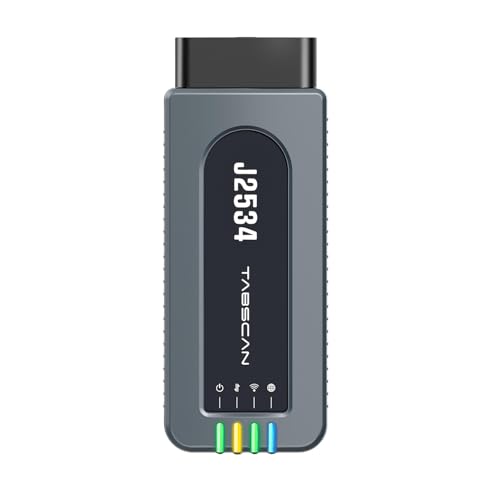
- 【J2534 Pass-Thru Device】 This budget-friendly J2534 pass-thru device delivers OEM diagnostics and reprogramming capabilities for dealerships, repair shops and automotive DIY enthuisasts, enables you diagnose, program and repair the vehicles more efficiently and precisely. Supporting J2534, D-PDU, CAN-FD and DoIP, this J2534 passthru tool ensures wide vehicle coverage. It's compatible with OE software application, ensuring seamless integration and original performance quality
- 【All-in-One Diagnostic Tool】 Simplify your workflow and tackle the complex diagnostics and repairs with confidence! This J2534 passthrough tool provides full system diagnosis, bi-directional control, maintenance reset services, ECU programming and ECU coding to run advanced diagnostics and programming. Equipped with the specialized platform, this J2534 pass-thru tool is fully compatible with OE software that helps technicians confidently handle complicated vehicle repair issues
- 【J2534 Diagnostic Tool】 The Tabscan J2534 pass-thru device is built with a dedicated platform, making it ideal for both professional and personal use. Simply download the driver for your ford vehicle within the platform—ensuring only one driver is installed at a time. Then connect the device to your vehicle’s OBD2 port and link it to your computer using the included USB A to USB C cable. Finally launch your OE software, select Tabscan J2534 VCI as interface, and begin diagnose and program
- 【Universal Compatibility】 Tabscan J2534 reprogramming tool is designed to be compatible with Ford vehicles for advanced diagnostics and programming. It supports J2534 protocols, along with D-PDU, CAN-FD and DoIP, ensuring seamless connectivity with older or modern vehicles. This J2534 diagnostic tool only works with computer running on windows 7/10/11. Vehicle compatibility varies by model or year, please confirm with us before purchase. Note: It's not compatible with 24V vehicles
- 【Professional Technical Support】 Tabscan J2534 pass-thru device provides a stable and seamless connection between your vehicle and computer for diagnostics, programming, and coding. But that's not all—we go beyond hardware. Our dedicated technical support team brings deep expertise in automotive diagnostics and programming. Whether you need help with setup, troubleshooting or latest diagnostic resources and upgrades, we provide fast, professional and reliable support every step of the way
- ALL OF THE J2534 PROTOCOLS - This single unit has all of the protocols you need for your OEM J2534 reprogramming and diagnostics including the latest in DoIP and CanFD
- J2534 TECHNICAL SUPPORT - FREE for the life of the tool. Staffed by technicians who understand vehicle repair and J2534 Pass‑thru
- TOOLBOX WITH OEM APPLICATION DESCRIPTIONS - educational video tutorials and real-time news – Giving you the confidence and up-to-date knowledge to get the job done
- J2534 v05.00 API - The newest version of J2534 to give you the latest in pass-thru technology
- FUTURE PROOF WITH 4 CAN CHANNELS - Going beyond the 3 required by select Chrysler/FCA models, CarDAQ-Plus 3 also provides a 4th to meet the needs of future OEM applications
This product presentation was made with AAWP plugin.