
Technical Bulletin
RECALL CAMPAIGN BULLETIN
| Classification: | Reference: | Date: |
| BR19-006c | NTB19-104c | September 10, 2020 |
VOLUNTARY SAFETY RECALL CAMPAIGN
2016-2018 MAXIMA, 2015-2018 MURANO AND 2017-2019 PATHFINDER; ABS ACTUATOR
This bulletin has been amended. See AMENDMENT HISTORY on the last page. Please discard previous versions of this bulletin.
| CAMPAIGN ID #: | R1916 and R1920 |
| APPLIED VEHICLES: | 2016-2018 Maxima (A36) |
| 2015-2018 Murano (Z52) | |
| 2017-2019 Pathfinder (R52) |
Check Service COMM or Dealer Business Systems (DBS) National Service History to confirm campaign eligibility.
INTRODUCTION
Nissan is conducting this voluntary safety recall campaign, on certain specific model year 2016-2018 Maxima, 2015-2018 Murano and 2017-2019 Pathfinder vehicles, to replace the ABS Actuator and Electric Unit (ABS control unit). This service will be performed at no charge to the customer for parts or labor.
IDENTIFICATION NUMBER
Nissan has assigned identification numbers R1916 and R1920 to this campaign. The correct number must appear on all communication and documentation of any nature dealing with this campaign.
DEALER RESPONSIBILITY
It is the dealer’s responsibility to check Service COMM or Dealer Business Systems (DBS) National Service History for the campaign status on each vehicle falling within the range of this voluntary safety recall which for any reason enters the service department. This includes vehicles purchased from private parties or presented by transient (tourist) owners and vehicles in a dealer’s inventory. Federal law requires that new vehicles in dealer inventory which are the subject of a safety recall must be corrected prior to sale. Failure to do so can result in civil penalties by the National Highway Traffic Safety Administration. While federal law applies only to new vehicles, Nissan strongly encourages dealers to correct any used vehicles in their inventory before they are retailed.
WARNING
If the ABS light is on and there is a delay for receiving parts or completing the repair, to avoid the risk of a building fire and/or personal injury:
- Park the vehicle outside the building and away from other vehicles and structures.
- Disconnect the vehicle 12 volt battery and leave it disconnected while the vehicle is parked waiting for service.
SERVICE PROCEDURE
- Replace the ABS Actuator and Electric Unit (ABS control unit).
- Refer to the ESM: BRAKES > BRAKE CONTROL SYSTEM > WITH ICC (OR WITHOUT ICC) > REMOVAL AND INSTALLATION > ABS ACTUATOR AND ELECTRIC UNIT (CONTROL UNIT).
- Follow all instructions in the ESM for ABS Control Unit replacement.
IMPORTANT: Make sure that ADJUSTMENT OF STEERING ANGLE SENSOR NEUTRAL POSITION and CALIBRATION OF DECEL G SENSOR are done as part of the ABS Control Unit replacement procedure (both are listed in the Installation section of the procedure in the ESM).
ABS CONTROL UNIT CONFIGURATION PROCEDURE
Before starting, make sure of the following to prevent damage to the control unit:
- ASIST on the CONSULT PC has been synchronized (updated) to the current date.
- All CONSULT-III plus software updates have been installed.
HINT: Although the ABS Control Unit Configuration Procedure is provided in the ESM, the instructions on pages 2 through 8 contain additional details that may be helpful.
- Connect CONSULT-III plus to the vehicle.
- Turn the ignition ON.
- Open / start C-III plus.
- Wait for the plus VI to be recognized.
- The serial number will display when the plus VI is recognized.
- Select Re/programming, Configuration.
- Use arrows (if needed) to view and read all precautions.
- Check the box confirming the precautions have been read.
- Select Next.
- If the screen in Figure 3 displays, select Automatic Selection (VIN).
- If the screen in Figure 3 does not display, skip to step 11.
- Make sure VIN or Chassis # matches the vehicle’s VIN.
- Select Confirm.
- Select Confirm.
- Select Manual Configuration.
- DO NOT select Reprogramming.
- Select the correct Type ID
- Refer to Table A (see page 7) for the correct Type ID number for the vehicle you are working on.
- If needed, use scroll arrows to find the correct number.
NOTE: When a vehicle has only one configuration available, a list will not be displayed. Select Next (step 17), and C-III plus will select the correct configuration.
- Select Next.
TABLE A
| MODEL | VEHICLE OPTIONS | TYPE ID # |
| 2015-2018 Murano | With ICC* 2WD | 47660-9UD7C |
| With ICC* 4WD | 47660-9UD7D | |
| 2016-2018 Maxima | With ICC* and 18 inch wheels | 47660-4RB2C |
| With ICC* and 19 inch wheels | 47660-4RB5C | |
| 2017 Pathfinder | Without ICC/FEB* 2WD | 47660-9PP4D |
| Without ICC/FEB* 4WD | 47660-9PP4C | |
| With ICC/FEB* 2WD | 47660-9PP2C | |
| With ICC/FEB* 4WD | 47660-9PP5C | |
| 2018-2019 Pathfinder | 2WD (All) | 47660-9PP2C |
| 4WD (All) | 47660-9PP5C |
* ICC = Intelligent Cruise Control; FEB = Forward Emergency Braking.
- Confirm the correct Type ID number is selected.
- Select OK.
- When configuration is complete, select End.
- After the procedure is complete (ABS control unit replaced and configured), check the ABS warning light for proper operation.
- When the ignition is turned ON, the ABS warning light illuminates for a few seconds and then turns OFF. This indicates the ABS is operational.
- Repairs beyond ABS control unit replacement are not covered by this bulletin.
PARTS INFORMATION
| DESCRIPTION | MODEL | PART # | QUANTITY |
| ABS Control Unit | Murano (2WD) | 47660-9UD6C | 1 |
| Murano (4WD) | 47660-9UD6D | ||
| Maxima | 47660-4RB1C | ||
| 2017 Pathfinder
(2WD without ICC/FEB) | 47660-9PP1D | ||
| 2017 Pathfinder
(4WD without ICC/FEB) | 47660-9PP1B | ||
| 2018-2019 Pathfinder
(2WD and 4WD without ICC) | 47660-9PP1B | ||
| 2017-2019 Pathfinder
(2WD with ICC/FEB) (4WD with ICC/FEB) | 47660-9PP1B | ||
| Brake Fluid (1) | N/A | 999MP-A4100P | 1 |
|
|
(1) Order this item through the Nissan Maintenance Advantage program: Phone: 877NIS-NMA1 (877-647-6621). Website order via link on dealer portal www.NNAnet.com and click on the “Maintenance Advantage” link.
CLAIMS INFORMATION
Submit a “CM” line claim using the following claims coding:
| CAMPAIGN (“CM”) I.D. | MODEL | DESCRIPTION | OP CODE | FRT |
| R1916 | Maxima and Murano | Replace ABS Control Unit | R19161 | 2.4 hrs |
| Pathfinder | R19163 | 2.6 hrs | ||
| R1920 | Maxima and Murano | Replace ABS Control Unit | R19200 | 2.4 hrs |
| Pathfinder | R19201 | 2.6 hrs |
NOTE: Refer to Service COMM or DBS to confirm the correct campaign ID number.
AMENDMENT HISTORY
| PUBLISHED DATE | REFERENCE | DESCRIPTION |
| November 12, 2019 | NTB19-104 | Original bulletin published |
| November 22, 2019 | NTB19-104a | Table A and PARTS INFORMATION section revised |
| December 23, 2019 | NTB19-104b | Added 2017 Pathfinder (4WD without ICC/FEB) to PARTS INFORMATION |
| September 10, 2020 | NTB19-104c | Title, Campaign ID #, and CLAIMS INFORMATION revised |
Remedy Instructions and TSB
RCRIT-19V807-2187.pdf 2727.844KB
Remedy Instructions and TSB
RCRIT-19V807-6231.pdf 2765.145KB
Remedy Instructions and TSB
RCRIT-19V807-0013.pdf 2757.503KB
Remedy Instructions and TSB
RCRIT-19V807-2963.pdf 2772.963KB
Remedy Instructions and TSB
RCRIT-19V807-9569.pdf 49.083KB
Remedy Instructions and TSB
RCRIT-19V807-1431.pdf 339.361KB
Remedy Instructions and TSB
RCRIT-19V807-5398.pdf 2641.524KB
Remedy Instructions and TSB
RCRIT-19V807-1675.pdf 130.664KB
Remedy Instructions and TSB
RCRIT-19V807-0322.pdf 129.711KB
Reprogramming
J2534-1 Re/Programming
Tutorial for Purchasing NERS Software
Software updated April 26, 2019 to version # 04.03.00. It is recommended the latest version of NERS be installed before connecting to a vehicle.
This NERS software supports reprogrammable Engine and Transmission control units from 1999 to 2019 model year vehicles, and 2005 MY and later VIN writing into ECUs, when using a Nissan validated pass-through device. Click the Reprogramming Tab for additional information on reprogramming. This software only provides ECU reprogramming, blank programming and VIN writing capability. It does not provide diagnostic or key programming capability. For Engine and Transmission control unit reprogramming and VIN writing capability on 2020 MY & newer, please use CONSULT-III plus or CONSULT-III plus R2R software.
Vehicle reprogramming requires the use of the following:
- Nissan validated J2534-1 device
- Nissan ECU Reprogramming Software (NERS)
- Personal computer running Windows XP (SP2 or later) or Windows 7 or 10 64Bit
- Applicable reprogram file
Nissan tested and validated the below listed devices. Nissan does not recommend the use of any other J2534-1 device not listed here.
| Manufacturer | Models |
| Actia | PassThru +XS |
| Autel | MaxiFlash Elite (with firmware v3.01) |
| Bosch | Mastertech VCI (SFP v5.11.9) |
| Dearborn Group | VSI-2534 |
| Drew Technologies/OPUS IVS | CarDAQ Plus, CarDAQ M, Mongoose ISO/CAN |
| Hella Gutmann Solutions | Mega Macs 42 SE (DT VCI), Mega Macs 66 (DT66) |
| Texa | TEXA Navigator TXTs Series |
Click the below link to purchase NERS diagnostic software.
Download Purchased ECU Data File(s)
Once you have purchased ECU data file(s) and your order is completed, your ECU files can be downloaded. Please verify that you are logged in to your account before proceeding.
Purchase of ECU data enables file download access for a period of 24 hours, after which time the file will no longer appear in your list of purchased data files. Be sure to download all data files immediately following your purchase.
When you purchase a J-2534 reprogramming file, you will get a zip file containing a data file (.dat, .pdx, .xcal, .7z), a .csv or .xml file and a Reprog_readme.pdf. Please review the readme file for information on where to place the files in your PC.
Please Note that J2534-1 supports reprogramming on 1999 MY and later vehicles.
How to find the proper J-2534 Reprogramming ECU file:
In order for you to locate the proper ECU file, you will need to look up the applicable Technical Services Bulletin(TSB) for your vehicle. Instructions in the TSB will pinpoint and advise you of the ECU part # to enter below.
Download Purchased ECU Data File(s)
Once you have purchased ECU data file(s) and your order is completed, your ECU files can be downloaded. Please verify that you are logged in to your account before proceeding.
Purchase of ECU data enables file download access for a period of 24 hours, after which time the file will not longer appear in your list of purchased data files. Be sure to download all data files immediately following your purchase.
Special Note: Nissan and Infiniti vehicle uses a high level of security when Re/programming or Configuration is performed to the vehicle ECUs. With the release of NERS software version 04.00.01 or greater, technicians will be required to login with their Nissan or Infiniti Techinfo website user ID and password to perform Re/programming and Configuration in NERS.
Login Instruction Guide
September 2013, Nissan and Infiniti began the phase in of “Blank” Service Parts ECUs and TCMs. Depending upon the model and model year, replacement modules come WITHOUT software. When a replacement module is installed in an applicable vehicle for any reason, it will need to be programmed.
When you purchase a J-2534 Blank programming file, you will get a zip file containing a data file (.dat, .pdx, .xcal, .7z), a .csv or .xml file and a Reprog_readme.pdf. Please review the readme file for information on where to place the files in your PC.
How to find the proper J-2534 Blank Programming ECU file:
- Obtain the blank ECU part number when you purchase the replacement ECU. Nissan’s and Infiniti’s parts catalog provides both the blank ECU part number and the ROM-DATA ID part number (after programming part number) to be used. Enter this blank ECU part number in the field below.
or
- Using C-III plus software, retrieve the blank ECU part number from the new ECU. Enter this blank ECU part number in the field below.
Please note: Take care after making your selection that the listed vehicle information matches the vehicle you are programming.
- Special Note: NERS Version 03.08 or higher supports Blank RWD, 5 speed TCM programming.
Download Purchased ECU Data File(s)
Once you have purchased ECU data file(s) and your order is completed, your ECU files can be downloaded. Please verify that you are logged in to your account before proceeding.
Purchase of ECU data enables file download access for a period of 24 hours, after which time the file will not longer appear in your list of purchased data files. Be sure to download all data files immediately following your purchase.
Special Note: Nissan and Infiniti vehicle uses a high level of security when Re/programming or Configuration is performed to the vehicle ECUs. With the release of NERS software version 04.00.01 or greater, technicians will be required to login with their Nissan or Infiniti Techinfo website user ID and password to perform Re/programming and Configuration in NERS.
Login Instruction Guide

- J2534 Pass-Thru Programmer: TOPDON RLink J2534 is an advanced diagnostic and reprogramming tool that support all J2534 protocols, as well as D-PDU, CAN-FD and DoIP, ensuring compatibility with a wide range of modern vehicles. It offers extensive versatility with support for over 18 major automotive brands, including Chrysler, Ford, GM, Nissan, Toyota, Honda, Subaru, Land Rover/Jaguar, Volvo, Wuling, Volkswagen/Audi, Mercedes-Benz, and BMW. NOTE: Not compatible with Ford IDS diagnostic software
- All-in-One OEM Diagnostics: This J2534 ECU programming tool elevates your automotive repair capabilities to new heights by delivering complete OEM diagnosis. Boasting comprehensive full-system diagnostics, intuitive repair guides, advanced ECU programming and coding, common reset services, a vast library of repair information and more, this all-in-one solution empowers technicians to effortlessly tackle complex vehicle issues with ease. *Not compatible with 24V vehicles
- Proven Performance You Can Trust: Backed by over 10000 real vehicle tests and benefit from a wealth of practical experience, this OEM reprogramming tool guarantees stable and exceptional performance. Supported by TOPDON's dedicated technical experts with in-depth knowledge of both auto repair and J2534 Pass-Thru programming, the RLink J2534 provides prompt and professional assistance, ensuring a smooth setup and reliable compatibility
- Integrated Excellence, Always Up-to-Date: Featuring the exclusive RLink Platform to provide a streamlined experience with one-click driver installation and management, ensuring flawless integration with your OE software, maintaining the original performance quality. The built-in operation guide makes mastering OE software quick and easy, so you can get started right away. Plus, with lifetime free updates, your diagnostics will stay current with the latest drivers and innovations
- Efficiency Meets Versatility: Engineered to support three CAN channels simultaneously - CAN FD and CAN-CC included, giving you the edge in fast troubleshooting. To perfectly synchronized with the OE software, please diagnose with active subscriptions and make sure your computer system is running a compatible 64-bit Windows version (7, 8, 10 or later) to fully leverage the power of RLink J2534. *We don't provide extra OE software

- Advanced VCI Box, Industry-leading J2534 Pass-Thru Technology: This J2534 Pass-Thru Programmer is designed espically for technicians, independent shop owners, and DIY enthusiasts, enables fast, reliable computer-based programming. It supports all J2534 protocols—including the latest DoIP and CAN FD—ensuring full compatibility with both legacy and next-generation vehicles.
- High-Speed OEM-Level Diagnostics & Programming: Unlock true OEM functionality with comprehensive system diagnostics, guided troubleshooting, coding, adaptations, resets, and programming—all designed to slash repair time. This all-in-one tool eliminates the need for multiple OEM devices, boosting efficiency and cutting costs. Equipped with High-Speed USB, it delivers 10x more data per second than competing solutions
- Coverage for 17 Car Brands & Ultra Reliability: Works seamlessly for Chrysler, for Ford(Forscan), for GM, for Nissan, for Toyota, for Honda, for Subaru(SSM4), for Land Rover/Jaguar, for Volvo, for Wuling, for Volkswagen, for Mercedes-Benz, and for BMW. Backed by over 10000 real vehicle tests and benefit from a wealth of practical experience, this OEM reprogramming tool guarantees stable and exceptional performance
- User-Friendly RLink Platform & Expert Support: TOPDON’s proprietary driver management platform offers a clean interface and lifetime free updates. Access a rich library of real-world case studies to stay ahead of the curve. Backed by a support team with 10+ years of J2534 and automotive repair experience, we provide one-on-one assistance to resolve any technical issue.
- 6.6 ft USB-C Cable & Portable Storage Case: The RLink J2534 diagnostic tool features a 6.6ft USB 2.0 Cable and a 1.2 ft OBDII Extension Cable, allows to connection your computer easily outside the vehicle. The included handled carry case offers easy portability, storage, and hanging options—keeping your gear clean and ready to go, anywhere.

- Dual WiFi & 10.1" Touchscreen: Provides a stable, high-speed wireless link 3x faster than bluetooth, and a responsive, professional interface. Topdon ONE obd2 scanner diagnostic tool ensures smooth, non-lagging diagnostic scan, boosting mechanic efficiency
- J2534 Pass-Thru Support: The included ONE VCI supports the J2534 standard, allowing it to function as a pass-thru device when paired with OEM diagnostic software.Through TOPDON’s RLink platform, technicians can perform dealer-level coding, expanding in-house capabilities without investing in multiple factory automotive scan tools
- OE Topology Mapping: Visualize the vehicle’s ECU network exactly as it’s built.Zoom, pan, and highlight specific modules to pinpoint component issues with precision.Topology mapping displays real-time communication between modules
- 50+ Service Functions: Covers high-demand services like ADAS calibration, DPF regen, TPMS reset, ABS bleed, and throttle adaptation.Expands your service menu, allows you to charge premium rates, and turns away zero jobs due to lack of tooling. Vehicle-specific functionality may vary
- Advaned ECU Coding: 10 of the most serviced brands in North America, including full ECU coding and flash hidden support for BMW, VW, Au-di, Benz, Porsche, Toyota, Ni ssan and more. Enables module replacement, feature customization, and personal settings with automatic backup or restore.Lets your shop safely offer high-margin customization services, attracting more customers and boosting profit

- [J2534 Pass-Thru Programmer] - TOPDON RLink J2534 is engineered for professional technicians, delivering OEM diagnostic and reprogramming capabilities. It supports all J2534 protocols, CAN-FD, DoIP, D-PDU. Compatible with 17 vehicle brands—such as Chrysler, Ford, GM, KIA, Hyundai, Nissan, Toyota, Honda, Subaru, Mitsubishi, MAZDA, Land Rover/Jaguar, Volvo, Volkswagen/Audi, Mercedes-Benz, and BMW. RLink J2534 can help reduce the cost of purchasing equipment from different brands.
- [All-in-One OEM Reprogramming and Diagnostics] - When seamlessly integrated with OEM diagnostic software, this dongle enables you to perform a wide range of functions, including ECU programming and coding, DTC reading and clearing, active tests, component matching, adaptations, rewriting, guided troubleshooting, and more. This all-in-one tool eliminates the need for multiple OEM devices, significantly boosting work efficiency.
- [Tested, Trusted, and Proven for Accuracy] - TOPDON RLink J2534 is renowned for its reliability, having successfully completed over 10,000 real-vehicle tests. The wealth of data and hands-on experience behind it ensures consistent performance and accurate results. You can trust this tool to deliver optimal performance.
- [One-Click Installation, Continuous Updates] - The exclusive TOPDON RLink platform streamlines installation with a one-click driver setup, allowing you to quickly access OEM software for diagnostic and reprogramming tasks. With lifetime free updates, your RLink J2534 stays current without any additional cost, ensuring reliable performance for the long term. *We don't provide extra OE software.
- [Works with Windows Compatibility and OEM Software Subscription] - The RLink J2534 supports three CAN channels - including CAN FD and CAN-CC, providing advantages in the process of rapid troubleshooting. Compatible with Windows 7, 8 and 10 (64-bit) and higher versions of the system. For full functionality, an active OEM software subscription is required for each supported vehicle brand. Please note that the dongle does not include OEM software, which must be purchased separately to access brand-specific diagnostic and reprogramming features.
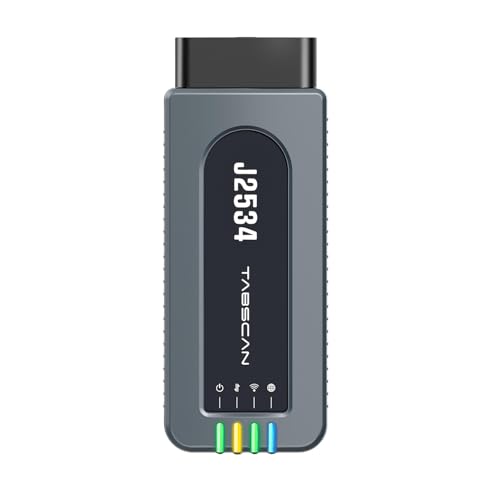
- 【J2534 Pass-Thru Device】 This budget-friendly J2534 pass-thru device delivers OEM diagnostics and reprogramming capabilities for dealerships, repair shops and automotive DIY enthuisasts, enables you diagnose, program and repair the vehicles more efficiently and precisely. Supporting J2534, D-PDU, CAN-FD and DoIP, this J2534 passthru tool ensures wide vehicle coverage. It's compatible with OE software application, ensuring seamless integration and original performance quality
- 【All-in-One Diagnostic Tool】 Simplify your workflow and tackle the complex diagnostics and repairs with confidence! This J2534 passthrough tool provides full system diagnosis, bi-directional control, maintenance reset services, ECU programming and ECU coding to run advanced diagnostics and programming. Equipped with the specialized platform, this J2534 pass-thru tool is fully compatible with OE software that helps technicians confidently handle complicated vehicle repair issues
- 【J2534 Diagnostic Tool】 The Tabscan J2534 pass-thru device is built with a dedicated platform, making it ideal for both professional and personal use. Simply download the driver for your ford vehicle within the platform—ensuring only one driver is installed at a time. Then connect the device to your vehicle’s OBD2 port and link it to your computer using the included USB A to USB C cable. Finally launch your OE software, select Tabscan J2534 VCI as interface, and begin diagnose and program
- 【Universal Compatibility】 Tabscan J2534 reprogramming tool is designed to be compatible with Ford vehicles for advanced diagnostics and programming. It supports J2534 protocols, along with D-PDU, CAN-FD and DoIP, ensuring seamless connectivity with older or modern vehicles. This J2534 diagnostic tool only works with computer running on windows 7/10/11. Vehicle compatibility varies by model or year, please confirm with us before purchase. Note: It's not compatible with 24V vehicles
- 【Professional Technical Support】 Tabscan J2534 pass-thru device provides a stable and seamless connection between your vehicle and computer for diagnostics, programming, and coding. But that's not all—we go beyond hardware. Our dedicated technical support team brings deep expertise in automotive diagnostics and programming. Whether you need help with setup, troubleshooting or latest diagnostic resources and upgrades, we provide fast, professional and reliable support every step of the way
- ALL OF THE J2534 PROTOCOLS - This single unit has all of the protocols you need for your OEM J2534 reprogramming and diagnostics including the latest in DoIP and CanFD
- J2534 TECHNICAL SUPPORT - FREE for the life of the tool. Staffed by technicians who understand vehicle repair and J2534 Pass‑thru
- TOOLBOX WITH OEM APPLICATION DESCRIPTIONS - educational video tutorials and real-time news – Giving you the confidence and up-to-date knowledge to get the job done
- J2534 v05.00 API - The newest version of J2534 to give you the latest in pass-thru technology
- FUTURE PROOF WITH 4 CAN CHANNELS - Going beyond the 3 required by select Chrysler/FCA models, CarDAQ-Plus 3 also provides a 4th to meet the needs of future OEM applications
This product presentation was made with AAWP plugin.